Emoji Battery Icon Customize
- 4.6
- Rating
- 10.00M
- Installs
- Free
- Price

 Analysis by App-foxy
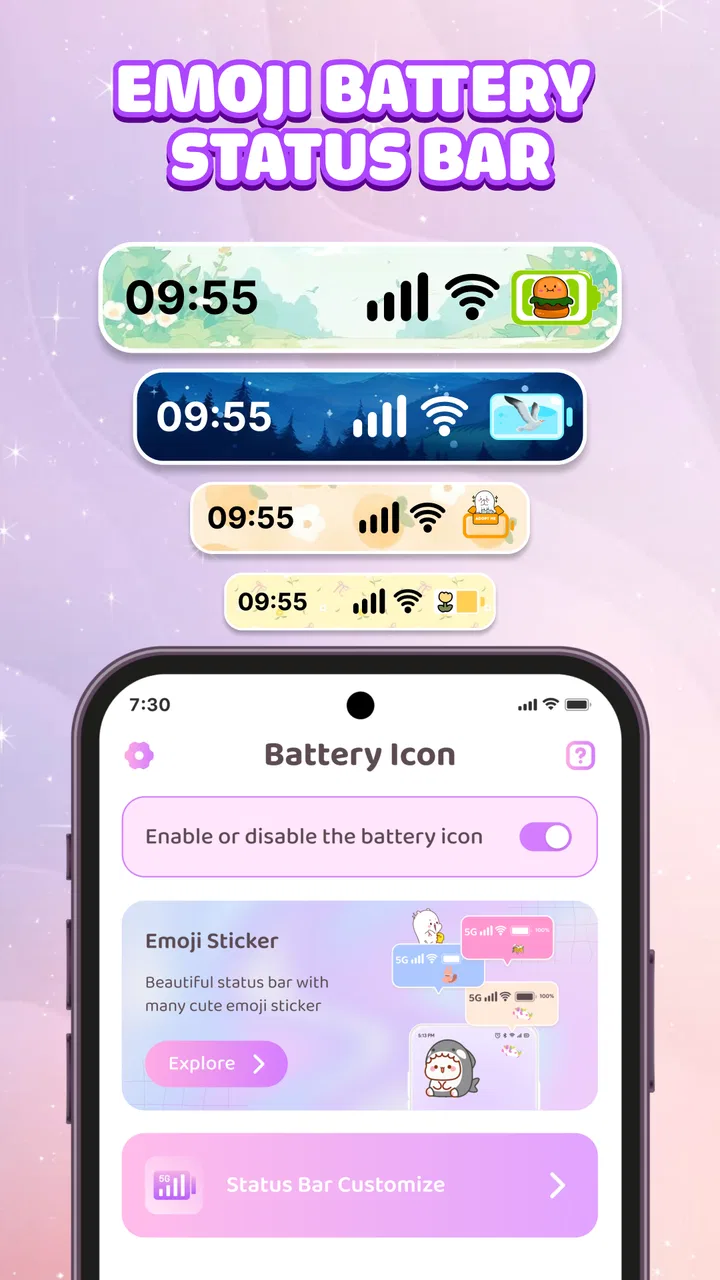
I installed Emoji Battery Icon Customize expecting a small personalization tool rather than a full phone makeover, and that is exactly where it makes sense. Its focus is simple: replace the ordinary battery indicator with a more expressive emoji-style widget and icon treatment. I like that narrow purpose because it does not pretend to redesign every part of Android. It gives one usually forgettable piece of the interface a little personality.
The app comes from Smart Utilities Hub and sits in the personalization category. It is free to install, rated for Everyone, and runs on devices using Android 8.0 or later. The current version is 1.3.1. Those details make it accessible to a wide range of Android users, although the actual experience still depends on how a particular phone handles widgets, background activity, and home-screen customization.
My overall impression is that this is best understood as a visual accessory. It can make checking battery level feel more playful, especially if you already enjoy emoji themes, cute icons, or coordinated home screens. It is not the right download if you want a deep battery-monitoring suite, charging diagnostics, or a replacement for the system status bar. The appeal is personality, not technical battery analysis.
You May Also Like

 AccuWeather: Weather Radar
AccuWeather Review: A Quick, Clear Forecast for Everyday Decisions
For everyday plans, the best forecast is the one you can understand quickly. AccuWeather makes rain timing, radar, and local conditions easy to act on, with a few trade-offs.

 Hill Climb Racing
Why Hill Climb Racing Still Turns Crashes Into One More Run
A tiny car, a bumpy hill and one more upgrade: Hill Climb Racing keeps resurfacing because its simple chaos makes every near-miss feel personal.

 AliExpress - Shopping App
AliExpress Makes Global Shopping Feel Personal, but Shoppers Bear the Risk
AliExpress turns a global marketplace into a pocket-sized discovery engine. Its reach is useful, its shopping loop compelling, and its trade-offs easy to miss.

 Lords Mobile: Kingdom Wars
Lords Mobile Is a Kingdom-Building Routine, Not a Quick Match
A case-by-case verdict on the building, battles, device demands, and social commitments that make Lords Mobile rewarding for some players and exhausting for others.

 PDF Scanner app - TapScanner
TapScanner Makes Paperwork Easier to Capture, Check, and Share
TapScanner makes scanning with a phone feel less like a rescue operation and more like a dependable step in getting work done. Its capture tools are useful, though not flawless.

 Block Blast!
 Shows How Much a Puzzle Game Can Leave Out
A quiet grid game shows why puzzle players increasingly value instant clarity, repeatable skill and low-pressure play—and where the genre still needs to catch up.
More From Our News Desk
View All News


How the customization feels in everyday use
The first useful distinction is between the phone’s built-in battery indicator and a home-screen widget. Android’s standard indicator remains the practical reference for a quick glance from any screen. An emoji battery widget, by contrast, is something you deliberately place where you want it. That makes the app more relevant to people who spend time arranging their home screen and less relevant to someone who rarely looks at widgets.
I found the concept particularly easy to understand in a normal morning routine. Imagine placing the widget beside a clock, calendar, or favorite shortcut. Before leaving home, you can glance at the larger, more decorative battery display while checking the rest of your screen. It turns a routine check into something more visible and personal without requiring you to open a separate battery dashboard.
That same setup can work well on a minimalist home screen. Instead of filling the display with several utility panels, you can use one battery element that contributes to the visual theme. A cute emoji treatment may fit a bright wallpaper, a soft color palette, or a playful arrangement of icons better than the standard system symbol. The benefit is small, but it is immediate: the phone feels more deliberately arranged.
There is also a useful trade-off in choosing a decorative widget over a normal icon. A widget can be easier to notice because it occupies more space, but it also consumes part of the home screen. On a compact display, that space may be more valuable for messaging, maps, or a frequently used app. I would place it on a secondary screen if the main screen is already crowded, then keep the system indicator available for quick checks elsewhere.
What the free access actually gives you
The app is free, so the basic decision is not whether to pay before trying it. You can test whether the visual idea suits your phone and your habits without an upfront purchase. That is important here because personalization is subjective. A widget can look appealing in screenshots and still feel unnecessary once it is sitting among your real shortcuts.
There are in-app purchases ranging from $1.99 to $9.99 per item. I would therefore treat the free installation as an opportunity to evaluate the core experience, not as proof that every possible customization is included at no cost. The sensible approach is to use the free portion first, check how well the widget fits your launcher, and only then decide whether any optional purchase adds enough visual value for you.
For me, the paid question comes down to frequency of use. If the emoji battery display remains on your home screen every day and helps complete a theme you genuinely enjoy, a small optional purchase can be easier to justify than buying a novelty you will remove after one afternoon. On the other hand, if you only want a battery percentage, Android already provides that through its standard interface, so paying for decoration would not improve the practical function of the phone.
I would also avoid judging value by the number of customization choices alone. The important test is whether the available look works with your wallpaper, icon arrangement, and launcher spacing. A single well-matched widget can be more satisfying than a large collection of styles that never quite fits. Since the app’s purpose is visual, personal fit matters more than technical specifications.
Small setup decisions that make a difference
My first tip is to decide where the battery information is most useful before placing anything. If you frequently check charge while working, put the widget near the area your eyes already visit. If the phone is mostly used for communication, a secondary home-screen panel may prevent it from competing with essential shortcuts. This sounds obvious, but it avoids the common mistake of treating a decorative widget as free space.
My second tip is to compare it with your wallpaper in ordinary lighting, not just while choosing the layout. A cheerful emoji can look clear against a simple background but become visually lost over a busy photograph. If the symbol is hard to read, the customization has failed its main job, even if it looks attractive in isolation. I would prioritize contrast and glanceability over matching every color perfectly.
A third consideration is how you use battery information. Someone who needs an exact percentage, charging status, or detailed consumption breakdown should keep the phone’s built-in battery screen as the authority. The emoji presentation is better as a quick visual cue than as a substitute for detailed system information. When battery life becomes urgent, I would check Android’s own controls rather than relying only on a decorative representation.
Another practical habit is to review the home screen after a day or two rather than deciding immediately. Novelty can make any new widget feel useful at first. After normal use, you will know whether it genuinely helps you notice charge level or merely occupies space. If it becomes visual clutter, removing it is the right outcome; personalization should serve the layout, not dominate it.
Where the app is stronger than ordinary alternatives
The usual alternative is the standard Android battery icon. It is dependable, always available in the system interface, and requires no extra home-screen space. For pure utility, it remains the better choice. It also avoids the question of whether a third-party widget will suit a particular launcher or screen arrangement.
Emoji Battery Icon Customize has a different advantage: it makes battery information part of the phone’s visual identity. A standard icon communicates charge level, but it rarely contributes to the mood of a home screen. This app is more appealing when you see the phone as something to arrange and personalize rather than merely operate.
It can also be preferable to a large general-purpose battery app when all you want is a more enjoyable glance at charge. A broader utility may offer additional dashboards, but those extras can be unnecessary if your goal is a single expressive element. The focused design is a strength for users who want a lighter, more decorative change.
At the same time, a dedicated battery-monitoring tool is the better option for someone investigating unusual drain, comparing app usage, or managing charging behavior in detail. This app should not be selected because its emoji presentation looks like a technical diagnostic feature. Its value is in the interface layer, not in replacing Android’s deeper battery tools.
Limitations I would consider before keeping it
The biggest limitation is that the benefit is mostly visual. Once the novelty wears off, the widget still performs a task Android already handles. That does not make it pointless, but it means the app has to earn its place through appearance and convenience rather than through new battery capabilities.
Home-screen widgets can also introduce friction that a built-in indicator does not. You need to choose a location, make room, and decide whether the display remains readable beside other elements. Different launchers may present widgets differently, and a layout that looks balanced on one phone may feel oversized or cramped on another. I would test the placement before committing to a paid customization.
There is a further trade-off between charm and information density. A cute icon may communicate “high,” “medium,” or “low” charge at a glance, but users who depend on precise information may find a standard percentage more useful. If you regularly plan travel, work sessions, or navigation around remaining battery, decorative shorthand should complement the system display rather than replace it.
The app is also not a universal recommendation for every phone owner. People who keep a nearly empty home screen, use a launcher with strict layout preferences, or dislike emoji aesthetics will probably gain little from it. Likewise, anyone expecting lock-screen changes, a complete icon pack, or extensive device-wide theming should look for a broader personalization product instead.
Who is most likely to enjoy it
I think the best audience is someone who already adjusts wallpapers, icons, widgets, and colors to create a particular mood. For that person, the battery display is not an isolated novelty; it is one more detail in a coordinated layout. The app is especially easy to recommend to a friend who says their phone feels functional but visually dull.
It also suits users who want a visible battery cue without installing a large utility suite. A single focused widget can be less distracting than a dashboard full of charts and controls. If your goal is to make the home screen friendlier while keeping the rest of the phone familiar, this narrow approach is sensible.
Families may appreciate the approachable presentation as well, since the app is rated Everyone and the emoji concept is easy to understand. I would still treat the age rating as a general content classification, not as a promise that every phone will display the widget identically. The actual fit depends on the device and home-screen setup.
Its popularity suggests that the idea has found a substantial audience: it has more than ten million installs and an average rating of 4.7 from around thirteen thousand ratings. I see those figures as evidence that the concept connects with many users, not as a guarantee that it will match your taste. Personalization apps are unusually dependent on individual style, so trying the free experience remains more useful than relying on popularity alone.
My value judgment and final recommendation
Smart Utilities Hub has kept the idea focused, and that focus is both the reason to try it and the reason not to overexpect from it. The app can make a home screen feel more cheerful, give battery information a more noticeable place, and complete a carefully chosen theme. It does not turn battery management into a more powerful technical system, and it should not be evaluated as though it does.
I would recommend installing it if you enjoy expressive phone layouts and want to experiment without an upfront cost. Use the free access to check three things: whether the widget is readable with your wallpaper, whether it fits without displacing something important, and whether you still like seeing it after normal daily use. Those checks tell you more about its value than a feature count.
I would skip optional purchases if the standard Android indicator already gives you everything you need or if the widget feels like clutter after a short trial. I would also choose a conventional battery utility when precise monitoring is the priority. In those cases, the decorative layer does not solve the real problem.
For the right user, though, this is a pleasant little upgrade rather than a pointless replacement. I like it as a way to give a functional detail some character, provided expectations stay realistic. My verdict: try the free version for the visual effect, pay only if it becomes a lasting part of your home-screen design, and skip it when battery analysis matters more than personality.
Emoji Battery Icon Customize is therefore worth considering for Android users on version 8.0 or newer who want a cute, visible battery accent and are comfortable treating personalization as an aesthetic choice. It is free to start, has optional purchases between $1.99 and $9.99 per item, and delivers its best value when the widget genuinely improves the way your home screen feels and functions.
FAQs for Emoji Battery Icon Customize
01What features does Emoji Battery Icon Customize offer?
Emoji Battery Icon Customize provides users with the ability to personalize their battery icon with a variety of emojis. The app includes a diverse selection of emojis and customization options to match your mood or style. Users can also adjust the size and position of the emoji on the battery indicator, making it a fun way to keep an eye on battery life.
02Is Emoji Battery Icon Customize compatible with all devices?
The app is designed to be compatible with most Android and iOS devices. However, users should ensure their device meets the minimum operating system requirements specified in the app store. It's advisable to check for any updates or specific device restrictions in the app description before downloading.
03How does Emoji Battery Icon Customize affect battery performance?
Emoji Battery Icon Customize is optimized to have minimal impact on battery performance. The app runs efficiently in the background, ensuring your device's battery life remains largely unaffected. However, as with any app, excessive customization or frequent changes may have a slight impact on battery consumption.
04Is Emoji Battery Icon Customize safe to use?
Yes, Emoji Battery Icon Customize is safe to use. It does not require intrusive permissions and adheres to standard privacy guidelines. The app does not collect personal information, ensuring user data remains secure. Always download from official app stores to avoid malicious versions.
05Are there any in-app purchases or ads in Emoji Battery Icon Customize?
The app offers a range of basic features for free, but there are optional in-app purchases available for additional emojis and advanced customization options. Users may also encounter ads within the app, which help support the free version. An ad-free experience can typically be unlocked with a one-time purchase.
Pros
- Customizable battery icon designs.
- Easy to use interface.
- Low impact on battery life.
- Supports a wide range of emojis.
- Frequent updates with new features.
Cons
- Limited free design options.
- Some emojis might not display correctly.
- Ads in the free version.
- Requires Android 5.0 or higher.
- Occasional glitches in icon updates.

Emoji Battery Icon Customize
Gallery